Valdek

Free during pilot

The AI back office for subcontractors.

Get paid for the extra work. Valdek reads your contract and scope, watches every job, drafts the tags, notices and replies, checks them and chases what is unsigned or unpaid. You tap Approve.

The demo opens right away. No sign-up, no card.

New

It watches, drafts, checks and chases. You approve.

A big contractor has project engineers who read the contract, write the paperwork, chase signatures and check everything. A small sub has the owner, at night. Valdek does that job on every project, and a person taps Approve.

It watches
After every note, text, tag, GC response and deadline, and once a night, it reviews each job against the contract rules and the scope.
It drafts
A tag for extra work buried in a daily report. A written notice before the deadline. An RFI. A reply to a GC who pushed back.
It checks
Before a document goes out: the math, rates and markups against the contract, who directed the work, the date, the location, photos, the deadline and duplicates.
It chases
Unsigned tags, late answers and anything paid short show up with the amount and the days waiting, ranked by money and deadline.
  • Nothing goes to a GC until a person approves it
  • Every item shows the record it came from
  • When it is not sure, it asks instead of guessing
  • Every step is logged: what it saw, what it proposed, who approved
See a sample back office

Today

3 things need you

  • Draft a tagPier 9 Warehouse Retrofit

    Tuesday's daily report mentions extra work with no tag

    Why: The report says the crew moved two panels because Tom asked. No tag covers that work.

    Daily report, Tuesday

    “Tom had us shift panels LP-2 and LP-3 four feet east, me and Luis, 3 hours”

    Draft the tag Edit Dismiss
  • Written noticePier 9 Warehouse Retrofit$1,486.00Due in 2 days

    Written notice for Tag #1003 is due in 2 days

    Why: The contract gives 7 days for written notice of a change. No notice has gone out for this tag.

    Contract rules, Section 8.4

    “written notice within seven (7) days”

    Draft the notice Edit Dismiss
  • Remind the GCHarborview Medical Office, Level 2 TI$2,310.00

    Tag #1001 has waited 9 days for Mike Alvarez to sign

    Why: It was sent 9 days ago and has not been opened since. A reminder goes to Mike only when you approve.

    Tag #1001

    Send the reminder Edit Dismiss

    Nothing goes to the GC until you tap the button.

Sample Made-up jobs from the demo company.

The foreman said

“The super wants us to fire caulk the plumber's pipe penetrations on level 2.”

Looks extra

Your exclusions leave out firestopping for other trades' penetrations.

The line it relied on

“Firestopping of penetrations made by other trades.”

Exclusion · Bid proposal, page 2, item 6

Start a tag

Sample A reading aid for attorney review. Not legal advice.

Is this extra?

The super asks for something and the foreman has ten seconds to decide. He says it into his phone, in English or Spanish. Valdek reads that job's scope documents, the scope exhibit, your bid and your exclusions, and answers Looks extra, Looks in scope or Not sure.

  • It quotes the exact scope or exclusion line it relied on, and where that line is
  • One next step: start a tag, get it signed first, ask for it in writing, or ask the office
  • It says Not sure before it guesses
  • Every check is saved on the job, and the office hears about each Looks extra

A reading aid for attorney review, not legal advice. It never tells anyone to refuse work.

Find my lost money

Hand over the paperwork from a job you have finished: the contract and scope, the daily reports, your texts and emails with the GC, the invoices and change orders. Valdek lists the work that looks outside your scope and was never billed.

  • Every item shows the words it was found in and the scope line it is outside of
  • An estimate from your own rates, and only when the paperwork gives the hours
  • Each item is marked strong, likely or weak
  • On a job that is still open, one tap turns an item into a tag

An estimate and a reading aid, not a claim amount.

It is the first thing you can try after you sign up, on a job that is already done.

Sign up and try it

Looks outside your scope, never billed

$1,020.00

3 items. 2 with an estimate, 1 with no hours in the paperwork.

  • Strong$612.00

    Moved two panels after the wall layout changed

    Daily report, March 4

    “Tom had us shift LP-2 and LP-3 four feet east, 2 men 3 hours”

    Scope: Scope 2.1: panels installed at locations shown on E-201

    6 hours of Journeyman at $85.00, plus 20% markup

  • Likely$408.00

    Temporary lighting for the drywall crew on level 2

    Text from Priya Shah, March 11

    “can your guys string temp lights on 2 for the rockers tomorrow”

    Scope: Exclusion 3: temporary power and lighting for other trades

    4 hours of Journeyman at $85.00, plus 20% markup

  • WeakNo estimate

    Came back to re-pull wire in corridor B

    Daily report, March 19

    “re-pulled corridor B homeruns”

    Scope: No scope line found

    The paperwork gives no hours, so there is no number.

Sample An estimate and a reading aid, not a claim amount.

New

It reads your subcontract

The rules for getting paid for extra work are in the contract you signed: how many days you have to give written notice, who is allowed to authorize a change, how much markup you can add. Upload the subcontract for a job, as a PDF or as photos of the pages, and Valdek lists those rules for you.

  • Each rule comes with the section and page it was read from, and a short quote
  • Nothing is used until you confirm it, and you can correct any of it
  • Anything the contract doesn't say is marked Not in contract
  • No contract handy? Type the rules in by hand

A reading aid, not legal advice. Check each rule against your contract.

See it on a sample job

Contract rules

9 confirmed
Written notice of a change or claim
7 days Section 8.4, page 3
Who can authorize changes
Contractor's Project Manager, Contractor's Project Executive Section 8.2, page 3
Written authorization before starting
Yes, required Section 8.3, page 3
Markup cap on labor
15% Section 8.6, page 3
Markup cap on materials
15% Section 8.6, page 3
Markup cap on equipment
15% Section 8.6, page 3
Required T&M labor rates
Not in contract
T&M tickets submitted or signed within
1 day Section 8.7, page 3
Priced change order request due within
14 days Section 8.5, page 3

A reading aid, not legal advice.

Then it checks every tag against them

The deadline, counted down
Every tag shows the day written notice is due under that job's contract. The dashboard lists them soonest first, and the owner gets an email when 3 days and 1 day are left.
The right person
If the person who told your crew to do the work isn't someone the contract lets authorize changes, the foreman is warned, with a message ready to send asking for it in writing.
The right price
Markups and labor rates start from what the contract allows on that job, and a tag that goes over is flagged before the GC sees it.

One tap drafts the written notice of change on your letterhead. It cites the section, says what was directed, by whom and when, and reserves your right to added cost and time. When it goes out, the tag keeps the proof.

How it works

  1. 1

    Say it

    Tap the mic and say what happened, like you'd tell the office. Or share the GC's text. Valdek writes the tag: your labor rates, the material, a clean description. It also tells you what a GC could push back on.

  2. 2

    Sign it

    Hand the GC your phone, or text them a private link. They sign with a finger. Once it's signed the tag locks, so nobody can change it later.

  3. 3

    Get paid

    Download a one-page PDF for the change order request. The office sees what's signed, what's still waiting, and what's been billed.

One note. Every document.

At the end of the day the foreman talks for a minute, in English or Spanish. Valdek splits the note into drafts. The foreman checks each one and approves it. Nothing is saved or sent before that.

Everything lands on the job's timeline in date order, and the whole record exports as one job binder PDF for closeout or a claim.

See a sample day

Daily report
Work done, crew, equipment, deliveries, visitors, safety and weather. A clean PDF on your letterhead.
Crew hours
Regular and overtime per person per job. A weekly timesheet for payroll, with no clock-in to manage.
Extra-work tags
"The GC had us..." becomes a draft tag, and its hours come out of the day's hours.
Delays
Waiting on another trade, missing information, no access. One tap drafts the delay notice.
Questions for the GC
Open questions become RFI drafts. The GC answers by private link, with no account.
Job binder
The whole record in date order, in one PDF.

One page for the GC. No account.

Each GC contact gets one private link per job. It shows everything you have sent them: tags to sign, change order requests, notices, RFIs and the daily reports you share. They act on it right there, on a phone or a desktop.

When they push back, you see their words on the tag and answer in the same place. Revise it and the version they saw is kept, locked. Every step is recorded with a name and a time.

See the GC's page

Sign
With a finger or a mouse. The tag locks the moment they do.
Reject, with a reason
A reason is required, so you know exactly what to answer.
Ask a question
It lands on the tag. Your answer shows on their page.
Approve in full or in part
A change order request, with the amount they agree to.
Acknowledge a notice
Proof your written notice was received, with a name and a time.
Answer an RFI
Right on the page, and the answer stays on file.

A tag the GC takes seriously

It reads like the T&M tag they already know: who asked, where, what was done, labor and material line by line, and a total. Then their own signature, with the date and time.

  • Labor at the rates you set once, with your markup
  • Guessed prices marked as guesses, so nothing looks padded
  • Photos from the phone camera, right on the tag
  • Locked the moment it's signed
Time & material tag · customer copyOct 19, 2026

Northside Electric

Extra work order

No.1001

Project
Harborview Medical Office, Level 2 TI
General contractor
Coastline Builders
Location
Room 210
Work asked for by
Mike Alvarez, Coastline Builders

Description of extra work

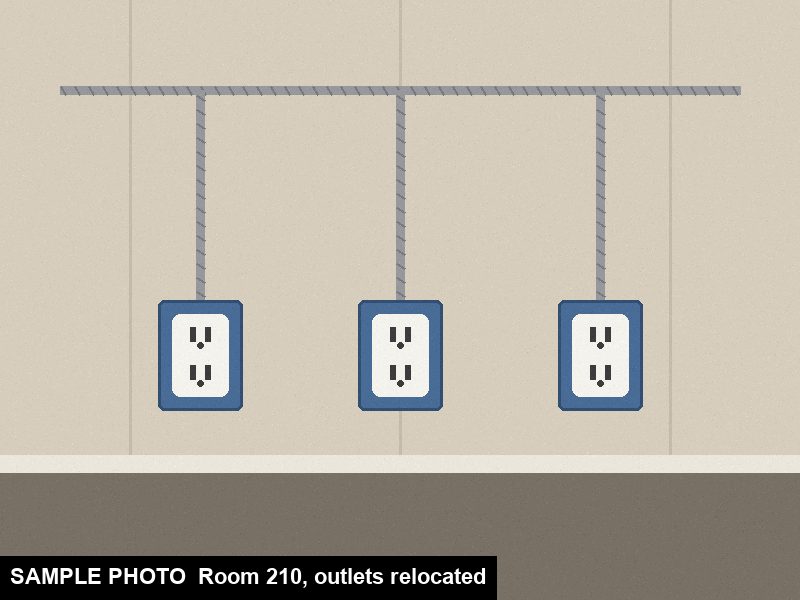
Relocate 3 outlets for revised casework

Relocated three receptacles in Room 210 to clear the revised casework layout, as directed by Mike Alvarez of Coastline Builders. Installed new boxes and extended MC cable to the new locations. Outside original scope.

Labor
ClassCrewHrsRateAmount
Journeyman23$85.00$510.00
Material
ItemQtyEachAmount
4in square box with ring3 ea$6.40$19.20
12/2 MC cable40 ft$1.25$50.00
Labor
$510.00
Markup on labor 15%
$76.50
Material
$69.20
Markup on material 15%
$10.38
Total
$666.08

Photos

  • Photo 1

Accepted by general contractor

Signature of Mike Alvarez

Mike Alvarez · Oct 19, 2026, 8:20 AM PDT · signed in person

The office sees every dollar

One screen for the owner: how much extra work is logged, how much the GC has signed for, and how much is still at risk. Unsigned tags are listed oldest first, and anything waiting more than a week is flagged.

When it's time to bill, mark tags billed and export the list to a spreadsheet.

Made for gloves and sunlight

Built for small commercial subcontractors: electrical, mechanical, plumbing, drywall, fire protection. Any trade where the GC says “just take care of it” and the foreman is the one who has to write it up.

Big buttons
Every control is sized for a gloved thumb.
Reads in the sun
Black on white and yellow, no pale grey text.
Dark mode
Follows your phone, for early starts and late pours.
No app store
Opens in the browser. Add it to the home screen.

Free during pilot

Valdek is new. While we work with the first crews, it costs nothing: no card, no trial clock. We will tell you before that changes.

Questions

Does the AI send anything on its own?

No. It proposes, with its reason and the record it relied on, and a person taps Approve, Edit or Dismiss. Nothing goes to a GC without that tap. An owner can switch on automatic reminders for unsigned tags only, and that is off unless you turn it on.

How does it know what is extra?

You upload each job's scope documents: the scope exhibit, your bid or proposal, and your exclusions. An answer quotes the exact line it relied on. When the documents don't settle it, the answer is Not sure. It is a reading aid for attorney review, not legal advice, and it never tells anyone to refuse work.

What is Find my lost money?

You hand over a finished job's paperwork and it lists work that looks outside your scope and was never billed. Each item shows where it was found. The dollar figure is an estimate from your own rates, shown only when the paperwork gives the hours. It is not a claim amount.

What is a T&M tag?

A time and material tag is the slip you write when a GC asks for work that wasn't in your contract. It lists who asked, what you did, the labor and material, and the price. A signed one is your proof the extra work was requested.

Does the GC need an account or an app?

No. They sign on your phone, or you send a private link and they sign on theirs. The link shows that one tag and nothing else.

How does Valdek read my contract?

You upload the subcontract for a job, as a PDF or as photos of the pages. Valdek lists the terms that affect extra work, such as the written notice deadline, who can authorize a change and the markup caps, each with the section it came from and a short quote. Nothing is used until you confirm it, and you can correct any of it or type the rules in yourself. It is a reading aid, not legal advice. The file is stored privately for your company and you can delete it.

What if the AI gets something wrong?

You check every line before anything is saved or sent, and you can change all of it. Prices it had to guess are marked as guesses. You can also skip the AI and fill the tag in by hand.

Does a signature mean I'll get paid?

A signed tag shows the GC agreed the work was extra and what it cost. Whether and when it is paid still depends on your contract. Valdek gives you the record; it does not give legal advice.

Can my foremen use it?

Yes. The owner invites foremen with a link. Foremen write, photograph and get tags signed. Only the owner sees company totals, rates, and billing.

What phone do I need?

Any current iPhone or Android phone. Valdek runs in the browser and can be added to the home screen like an app. It needs a signal or Wi-Fi to save.

Can I get my tags out?

Every tag downloads as a PDF, and the owner can export all tags to a spreadsheet file for billing.

What does it cost?

Nothing during the pilot. Valdek is new and we are working with the first crews using it. We will tell you before that changes.